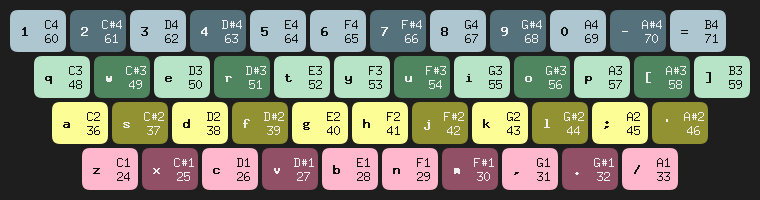
Keymidi is simple tool that turns a computer keyboard into a MIDI controller with its own Virtual Port.
Keystrokes and mouse clicks are translated into MIDI note on/eff events.
It was created to control the live playing of melodies in Melrōse.
Documentation and sources for this free tool is here.
midicycles is a small tool written in Go that visualizes incoming MIDI notes.
It was originally created to both hear and visualize output from Melrōse programs, but it also works with any MIDI source.
The project is simple to start and flexible to tune. On startup it opens one or more MIDI input ports and renders note activity in near-real time.

How it renders
Most MIDI events represent a Note-ON or Note-OFF moment at which a Muscial Note (by number) is started or stopped.
The visualizer uses the MIDI number as the radius of a circle segment (bow).
The angle of the bow increasing with the duration of the note.
The visualizer can show multiple notes at the same time.
For Go developers working with Protocol Buffers, ensuring data integrity is crucial. While Protobufs guarantee type safety, they don’t enforce semantic rules out of the box. This is where protocheck comes in, a lightweight and powerful tool for adding validation logic to your Protobuf messages.
This blog post will explore the design choices behind protocheck, focusing on its simplicity of declaration and code generation. We’ll also compare it to bufbuild/protovalidate to help you choose the right tool for your project.
melrose-mcp is a tool that uses the MCP protocol to receive melrōse expressions to play.
You install this tool locally on your machine and connect it from an MCP client such as Claude Desktop, Goose, VSC etc.
example
Prompt:
play a tune from Claude Debussy
AI:
I'll create a small segment inspired by Claude Debussy's impressionist style using the Melrose language.
MCP server:
{
    `expression`: `sequence('(F4 A4 D5) 4(F4 A4 D5) (G4 B4 E5) 4(G4 B4 E5) (A4 C5 F5) 4(A4 C5 F5) (G4 B4 E5) 4(G4 B4 E5) (F4 A4 D5) 8= 8(E4 G4 C5) 4(F4 A4 D5)')`
}
See melrose-mcp for details how to install and use it.
The function map is used to create a composition by applying a transformation on each sequence in a collection.
1
2
3
4
5
6
7
|
a1 = sequence('G_3 D_ G_ A D_5 G_5')
a2 = sequence('D_3 A_3 D_ E A_ D_5')
a3 = sequence('E3 B3 E A_ B E5 ')
a4 = sequence('B2 G_3 B3 E_ G_ B')

c = map( join(a1,a3,a4,a2), fraction(8,resequence('1 4 2 4 3 6 5 4', _ )) )
loop(c)
|
line 1..4
Four sequences are created that play a nice combination of arpeggios.
Why you want this and how to become one
10-15 minutes read
This article is part of a series that began with The Replaceable Developer. That article examines how developers can prevent their current work from hindering their professional growth.
TL;DR
Growing your skills will open doors to new challenging opportunities, which in turn can lead to making a bigger impact and, with promotions, a higher salary.
The TEC model is a structured approach for achieving this.
Increase your theoretical knowledge, gain more diverse experience and communicate about it, both written and verbal.
Pick a new and exciting technology, apply it to some small (pet) project and share your findings with your fellow developers.
Repeat this.
Can AI tell me what design is implemented ?
Recently, I wanted to contribute to some open-source Go packages that I use.
Some of them have a large codebase with lots of subpackages.
Despite the carefully chosen names for this these packages, without an overview and design description, it will require quite some time reading sources and debugging tests before a mental model is created.
Without such an understanding, contributing to that open-source project is likely to fail.
Why you want this and how to become one
TL;DR
Once you are replaceable, you are free to start new initiatives, explore new technologies, solve the next complex problem which will make you happy and interested to stay at your job. Your organisation has a lower risk of discontinuity and can benefit more from your expertise. To be a replaceable developer, you need to
- deal with all the relevant unshared software that you have created in solitude;
- document knowledge about relevant processes.
 Photo: https://www.pexels.com/@jan-van-der-wolf-11680885/
Challenge
Over the years, as a developer as part of an organisation, you will work on many different software projects, learn a lot about the business and processes and will have created many software artefacts (packages, libraries, applications, services, architectures, infrastructure, …).
Using the notemap function with dots . and bangs ! you can write a pattern for an instrument.
In this example, multiple instruments are choosen from the General MIDI set.
The note C2 is typically assigned to a Kick drum.
The loop plays the 16 beats in a bar and for each bang ! it will shortly (16th) play the note.
You can start and stop each loop individually.
Once you have a MIDI capable sound program (such as a DAW) opened then tryout this example with the online Melrōse Playground yourself.
TL;DR
Melrōse is both a language and a tool to create and listen to music interactively, The language uses musical primitives (note, sequence, chord) and many functions (map, group, transpose) that can be used to create more complex patterns, loops and tracks. Melrōse uses MIDI output to produce sound by any (hard or software) device attached. Melrōse can also react on MIDI inputs to start, record and stop playing musical objects. A plugin is available for Microsoft Visual Studio for the best usage experience. For a quickstart, without any installation, you can use the Melrōse playground.